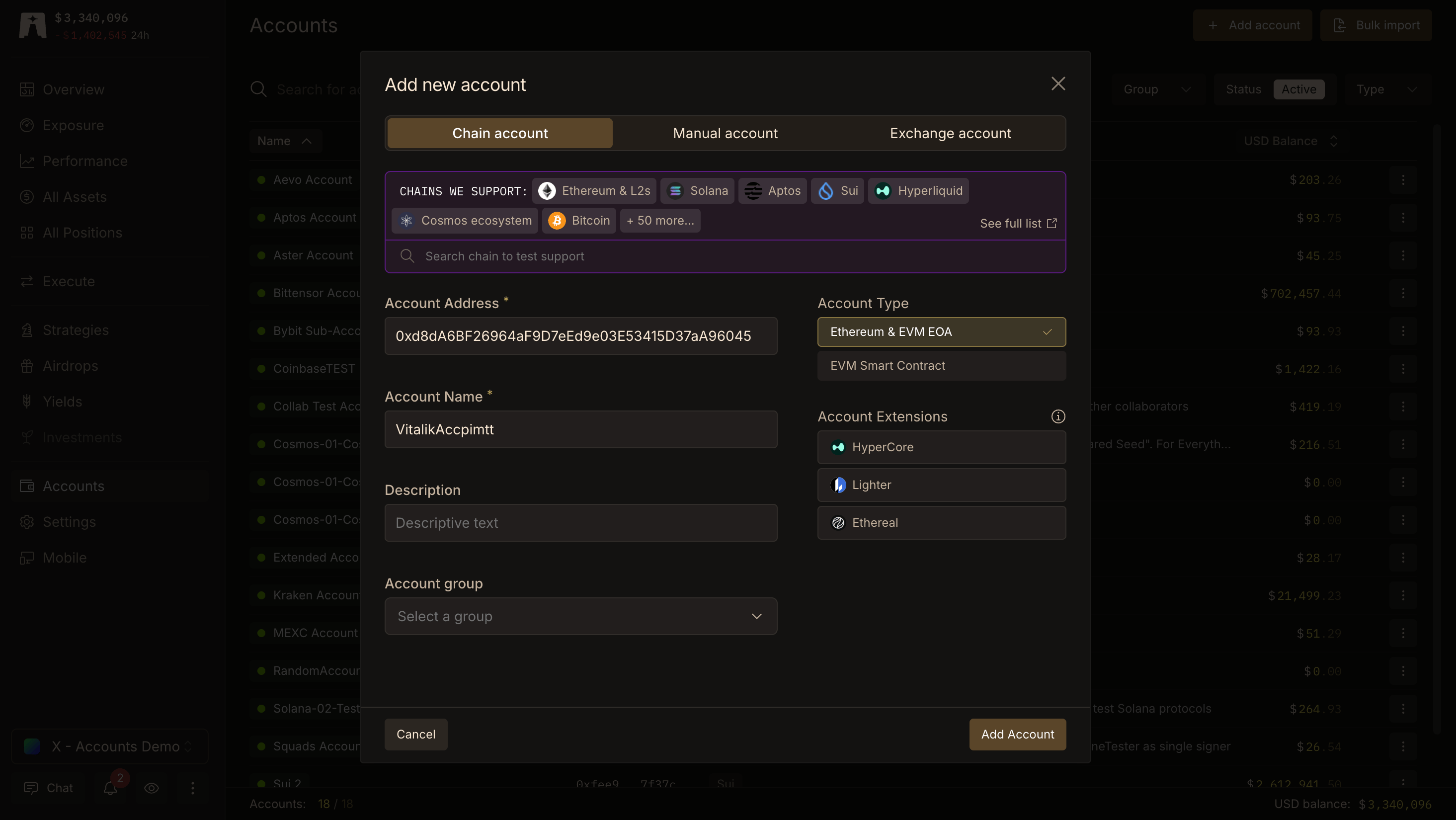
Lighthouse covers 50+ chains including Solana, Bitcoin, Hyperliquid, Cosmos and more. Full list here.
How to add an onchain account
Lighthouse automatically detects the chain or ecosystem that an address belongs to, just copy-paste and go!
Add single account
Bulk import
- Select the
Accounts page on the left sidebar.
- Click the
+ Add Account button on the top right.
- Paste the account Address.
- Add an Account Name and optional Type and Description.
- Confirm by clicking the
Add account button.
This feature is only available for onchain accounts.
- Select
Accounts on the left sidebar.
- Click the
Bulk Import button on the top right.
- **Upload a a screenshot, csv, json, text or image file **into the blue, “AI powered import” box.
- Upload a screenshot, CSV, JSON, text or image file into the blue, “AI powered import” box. Data can be loosely structured but headers and structured data will have higher accuracy.
- Our zero-data retention AI will parse addresses and names and fill the table below.
- Review imported addresses, up to 50 accounts per import.
- Click the
Import accounts button.
Only zero-data retention AI models are used to power Bulk Import which means that our AI providers do not store nor train their models on data Lighthouse shares with them.Lighthouse is committed to providing the most advanced UX to manage crypto assets without compromising on your data privacy.
Account Extensions (i.e. Hyperliquid, Lighter, Ethereal)
Account Extensions are opt-in, per-account add-ons that expand Lighthouse coverage to non-standard apps or protocols like Hyperliquid’s HyperCore, **Lighter.xyz **and Ethereal.trade. You can enable extensions when first adding an account or by editing an existing account.
EVM Account Extensions
These extensions are available on Ethereum EOA accounts:
- HyperCore — Hyperliquid’s onchain exchange, including futures positions, spot assets, vaults and HYPE staking. HyperEVM is automatically tracked by just adding your EVM account; HyperCore requires the extension.
- Lighter — Margin and futures positions on Lighter.xyz.
- Ethereal — Positions on Ethereal.trade.
- Reya — Positions on the Reya Network.
- Ostium — Positions on Ostium.
- Nado — Positions on Nado.
- Polymarket — Prediction market positions on Polymarket.
Solana Account Extensions
These extensions are available on Solana EOA accounts:
- Pacifica — Positions on Pacifica.